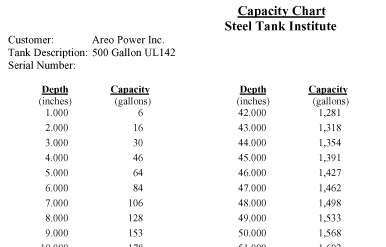
Tank Capacity Chart Software
Areo Power provides Tank Capacity Software from the Steel Tank Institute. Using this software you can print capacity charts for cylindrical and rectangular charts. Follow the instructions below to download and install.
Click here to download the software. Once you have downloaded the file, open the zip file. If you cannot open zip files please install www.winzip.com or a similar program. Unzip the contents to a temporary directory (for example c:\temp) and run the file "Setup.exe" in the Capacity directory of the temporary directory (for example C:\temp\Capacity). For detailed instructions see the readme file below.

Readme.txt (also included in the software download)

Tank Capacity Software
Program written by Jimmy Dale Schroeder
Copyright 1999 by Steel Tank Institute

This software is a stand alone program for calculating the capacity of horizontal
tanks of either cylindrical or rectangular configuration. It is designed to run only
in Windows95 or Windows98.

Installation
To load CapacityChart, click the Install button on the opening screen of the
start.exe program. Then look for the smiley-face icon on the Start -- Programs
menu in Windows.

Operation
To generate, print, or view a set of tank capacity calculations, simply enter the
information about your tank in the appropriate fields. You can move through the
screen either by selecting the field you want with the cursor or by using the "Tab" key.
You can change the client name simply by selecting and typing over it.
You must pick some other entry box to exit this field.
You can change the customer name, tank description, and serial number by
selecting the desired field, deleting the unwanted characters with the "Delete" or
"Backspace" keys, and typing new information.
Depth of liquid and volume of tank can be calculated in either millimeters and
litres or in inches and gallons.
Dimensions are either inside or outside tank dimensions. If outside dimensions
are chosen, then you must enter thicknesses. All volumes are based upon interior
dimensions.
If a striker plate is located under the opening being gauged, then check the
striker plate box. Volumes will then be calculated based upon the gauge stick
starting 1/4" (6 mm) above the bottom of the tank.
Increment is the finest distance between readings on the measuring stick being
used. In metric units this should be a whole number. In US units this should be a
decimal (i.e., 1/8" = .125, ¼" = .25).
Increment, tank dimensions, and thickness (if outside dimension is chosen)
must be entered before you can calculate volumes.
Once you have calculated volumes you may either scroll through the
information or print the results. Once you are finished viewing and/or printing
the information, exit to the main screen.

Disclaimer
We guarantee the accuracy of the calculations that produce the tank charts. The charts
can be no more accurate than the dimensions upon which they are based. Therefore, Steel
Tank Institute (STI) and its employees, officers, or representatives assume no liability
or responsibility, either direct or implied, for the accuracy of the measurements upon
which the tank chart calculations are based. Further, we assume no responsibility for
the accuracy of any inventory reconciliation based upon the charts produced by the
software or the ability of such to detect leaks, either large or small.

Steel Tank Institute
Steel Tank Institute is an international non-profit trade association representing
steel tank manufacturers and affiliated corporations. STI develops technical
standards for fabrication, corrosion control, installation, and secondary containment
for single and double wall steel storage tanks including the STI-P3, Permatank,
ACT-100, and ACT-100U underground storage tanks, as well as Fireguard, F921,
and F911 aboveground storage tanks. Corrosion protection and fabrication
technologies are licensed by STI to tank fabricators in the USA.

Steel Tank Institute
570 Oakwood Road, Lake Zurich, IL 60047
Telephone 847/438-8265
Internet: www.steeltank.com